
Shelly Security Checks
Shelly includes built-in PKGBUILD security checks for AUR installs and updates. Before you confirm a package, Shelly can review the resolved PKGBUILD data and flag patterns that deserve a closer look.
What Shelly checks
Section titled “What Shelly checks”Shelly currently focuses on four high-risk areas:
- Post-install scriptlets that fetch or execute code outside libalpm’s control.
- Local source files that are ELF executables or other binary content and cannot be safely reviewed as text.
- Privilege elevation commands that run package-controlled code as root.
- Spoofed package names, dependencies, URLs, and other attacker-controlled text that use Unicode homograph tricks.
Risky post-install behavior
Section titled “Risky post-install behavior”Shelly inspects resolved post_install scriptlets for tools that commonly download or run external code during installation, including npm, npx, yarn, pnpm, bun, pip, curl, and wget.
It also flags dynamic command construction that cannot be safely reviewed ahead of time, such as:
- Command substitution with
$(...)or backticks eval- Bash indirect expansion with
${!var} - Decode-into-shell pipelines such as
base64 -d | sh
Shelly also performs lightweight de-obfuscation before matching commands. That means tricks like b''u''n, cur\l, or n"p"m are still detected. If a risky tool name was deliberately hidden this way, Shelly escalates the finding to Critical.
Local binary and ELF source checks (Critical)
Section titled “Local binary and ELF source checks (Critical)”Shelly reviews local source=() files used by the PKGBUILD and flags files that appear to be binary content, including ELF executables.
If a local source file is binary, Shelly raises a Critical finding because the content cannot be meaningfully reviewed as plain text in the package review flow and may hide malicious behavior.
This includes extensionless files as well as names like .bin, and specifically identifies ELF headers when present.
Privilege elevation checks (Critical)
Section titled “Privilege elevation checks (Critical)”Shelly scans for privilege elevation tools such as sudo, sudoedit, doas, pkexec, run0, and su.
These checks apply to post_install, local source scripts, and PKGBUILD function bodies such as prepare(), pkgver(), build(), check(), and package().
When one of these tools is detected, Shelly reports a Critical finding because the package can run code as root outside Shelly and libalpm’s control.
If the tool name was intentionally obfuscated, Shelly still detects it and treats it as a strong malicious indicator.
Homograph and Unicode spoofing
Section titled “Homograph and Unicode spoofing”Shelly also looks for text designed to look trustworthy while using different Unicode characters underneath. This helps catch package or source data that visually resembles a known project but is not actually the same string.
Examples of suspicious patterns include:
- Zero-width, bidi, or other hidden control characters
- Mixed-script names, such as Latin letters mixed with Cyrillic or Greek
- Fullwidth or compatibility characters that collapse to ASCII
- Confusable Unicode characters whose skeleton maps to ASCII look-alikes
For example, a package name that visually resembles аpаche but uses a Cyrillic а can be flagged before install.
How results are shown
Section titled “How results are shown”When Shelly finds an issue, the result is surfaced through the PKGBUILD review flow before installation continues. In the UI app, the review dialog shows a security scan status banner alongside the PKGBUILD diff and lists each finding with its severity, hook, and matched line.
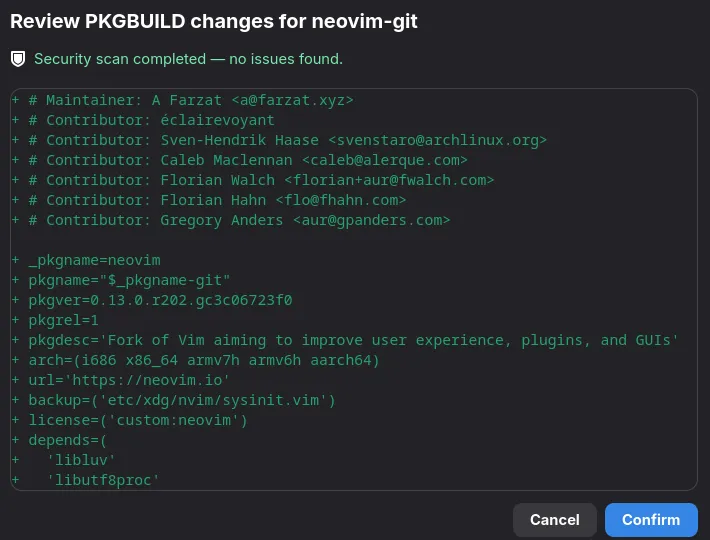
If no issues are found, Shelly reports that the security scan completed cleanly. If warnings or critical findings are present, you can review them and decide whether to continue or cancel.
Further reading
Section titled “Further reading”For general guidelines, inspection workflows, and security hygiene when using the AUR, see the AUR Safety Practices guide.